
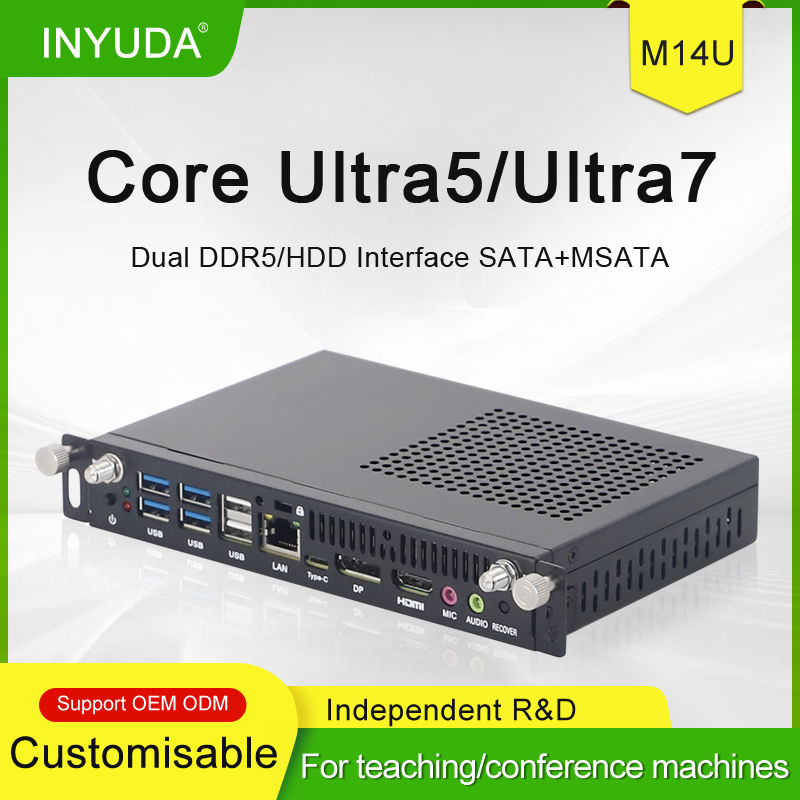


OPS is a standardized 80-pin pluggable computing module. Selection should be evaluated from five core dimensions: physical compatibility, computing platform, application scenarios, hardware configuration and operational stability, to avoid insufficient performance or over-specification.
1. Verify Physical Compatibility with Displays
First check the OPS slot specification of interactive panels: mainstream thickness options include 42mm (domestic standard) and 30mm (European standard), with fixed length and width of 180×195mm. Ultra-thin screens only support 30mm slim OPS modules. Confirm the 80-pin standard interface to ensure full interoperability of hot swap, audio/video, serial and power signals. For 24/7 commercial operation, prioritize models with dual heat pipes and turbo active cooling; fanless silent variants are acceptable for low-load advertising screens.
2. Match Computing Platforms to Application Scenarios
- Basic advertising screens & simple teaching whiteboards (no AI tasks): RK3568 ARM platform. It features a low-power 1TOPS NPU for 4K video loop playback with low cost, compatible with Android OS.
- Mid-tier AI recognition, passenger flow statistics & lightweight edge algorithms: Octa-core RK3576 platform with balanced 6TOPS computing power, supporting multi-channel video decoding and multi-screen split display with outstanding cost performance for mass commercial deployment.
- High-concurrency AI, local LLM deployment & multi-channel visual analysis: Flagship RK3588 solution with powerful NPU throughput and native 8K hardware encoding/decoding, ideal for industrial vision and smart security terminals.
- Windows office, video conferencing & screen casting: Intel Core Ultra/HX x86 architecture with full Windows compatibility, supporting 4K/8K ultra-high-definition output for government & enterprise meeting rooms and smart classrooms.
3. Configure Memory & Storage Based on Demands
- Memory: Minimum 8GB for basic video playback; 16GB recommended for multi-window operation and AI inference; 32GB/64GB for multi-stream video processing and heavy software. ARM modules adopt onboard LPDDR4X, while Intel® models use expandable DDR5 SO-DIMM slots.
- Storage: M.2 NVMe high-speed SSD as standard for fast boot and media loading; extra 2.5-inch SATA bay for mass media storage; TF card slot for offline advertising file expansion.
4. Confirm Interfaces & Expansion for Peripherals
List external devices in advance: touch cameras, wireless casting adapters, 4G/5G modules, industrial RS232 serial ports, microphones and keyboards/mice.
- Entry-level models: Gigabit Ethernet, multiple USB3.2 ports, 3.5mm audio jack, M.2 E-key slot for Wi-Fi/Bluetooth.
- Commercial & industrial models: Additional RS232 headers, SIM slots, Type-C PD fast charging, multi-display outputs (HDMI/DP/Type-C-DP).
- Multi-screen scenarios: Confirm support for independent multi-display output for split-screen advertising and multi-view teaching.
5. Evaluate OS, Power Supply & Long-term Stability
OS matching: Choose Intel platforms for Windows office; ARM Android/Linux for advertising and lightweight AI; domestic Feiteng x86 chips for domestic IT projects. Wide DC 12V~20V power input adapts to various interactive panels. Operating temperature range of 0℃~60℃ suits harsh environments such as outdoor venues and workshops. Built-in timed power-on, PXE diskless boot and one-key recovery simplify mass equipment maintenance.
Quick Selection Guide
Budget-limited pure video playback → RK3568
AI passenger analytics & mid-tier commercial displays → RK3576
Multi-channel vision & local large model deployment → RK3588
Windows conferencing & complex software operation → Intel® Core™ OPS.
You can always contact us to get the latest catalog to get to know more about the OPS Slot PC Module.